


About | Privacy Policy | Terms of Use | Support | Contact Us
Copyright © 2026 Tipard Studio. All Rights Reserved.

Windows

Rip your favorite Blu-ray/DVD movies or videos to popular formats

Powerful software to play Blu-ray/DVD videos and audio

Create Blu-ray disc/folder/ISO file with your own video

Backup/Copy your favorite Blu-ray to disc/folder/iso files
Mac

Rip your favorite Blu-ray/DVD movies or videos to popular formats on Mac

Powerful software to play Blu-ray and popular video formats on Mac
Windows

Rip DVD to any popular video format quickly of full quality

Create DVD from videos and burn video to DVD/Blu-ray freely

Copy DVD to DVD disc/folder/ISO files in a 1:1 ratio
Mac

Rip DVD to any popular video format quickly of full quality on Mac

Burn or author a DVD from videos with subtitles and chapters on Mac

Copy DVD to DVD disc/folder/ISO files in a 1:1 ratio on Mac
Windows

Rip DVD, convert 4K video, edit, and upscale videos to 5K/8K

Repair broken videos with high accuracy and support many formats

Convert any video to MP3, MP4, MOV, WAV, and other 350 formats

Upscale resolution, optimize brightness and remove video noise

The easiest tool to capture screen, game, audio, etc. with high quality

Convert any 2D video to 3D video and convert 3D to 2D video

Convert 4K video to 4K/1080P and common videos

Convert TS video to various popular video/audio formats
Mac

Rip DVD, convert 4K video, edit, and upscale videos to 5K/8K on Mac

Repair broken videos with high accuracy and support many formats on Mac

Convert any video to MP3, MP4, MOV, WAV, and other 350 formats on Mac

Upscale resolution, optimize brightness and remove video noise on Mac

The easiest tool to capture screen, game, audio, etc. with high quality on Mac

Convert any 2D video to 3D video and convert 3D to 2D video on Mac

Convert 4K video to 4K/1080P and common videos on Mac

Convert TS video to various popular video/audio formats on Mac
Desktop

Rip and convert DVDs to MP3 and support other audio formats

Reset Windows Admin and Standard user account password in seconds

Accurately Convert any PDF file to Word with OCR

Convert PDF to Word, Excel, HTML and Image with OCR
Online

Easily remove watermarks from many image file formats free online
Tipard Mod Converter is high-end, easy-to-use MOD Video Converter which can convert MOD files recorded by JVC, Panasonic, Canon digital camcorders to AVI, MP4, WMV, MOV and other video formats like MPG, MKV, FLV, MPEG-1, MPEG-2 video and more HD videos with excellent quality and ultrafast speed.
Except converting mod video functions, this powerful Mod Conversion software has more wonderful characters like editing functions - help you make your video special, such as merge, trim, crop, watermark and set effects.
This Mod Video Converter can give you a hand to convert any MOD video to almost all video formats, like WMV, MOV, AVI, MPEG, MP4, MKV, 3GP, FLV, SWF, MPG, VOB, MKV, SWF, RMVB, and so on. At the same time, it can export music or audio from mod files and convert them to MP3, WMA, AAC, OGG, WAV, and M4A, etc.
With the special MOD Video Converting software, you can enjoy your favorite mod videos on many types of portable players, including the iPad Pro, iPad Air/mini, iPhone SE, iPhone 6s/6, iPhone 6s/6 plus, iPhone 5, iPod Touch, Apple TV, Sony Walkman, Creative Zen, Apple TV, Nokia, PSP, Zune, PS3, Pocket PC, Windows Phone, Samsung, HTC, LG and more Android phones/tablets.
With free enjoyment of mod video on popular devices/players, there is no doubt that the any MOD video converter is the best. Just download it for free, you can play the .mod files recorded by HD camcorders like JVC, Panasonic, Canon on your PC, home DVD player, portable devices, Android phone or sharing on online websites conveniently.
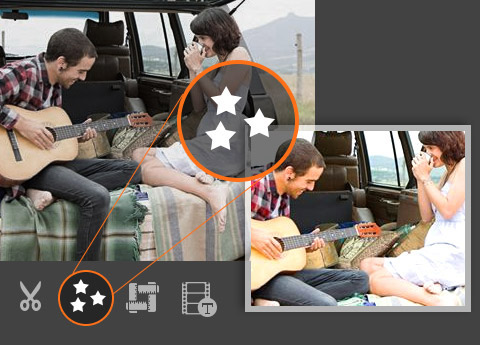
Using the Mod translator application, you are able to remove the black edges around your movie video and customize the aspect ratio for better enjoyment. This converter allows you to merge the contents you like to a long one. You can convert your mod video or audio files to certain parts that you like by Trim. Either you can drag the two slider blocks by mouse, or set the start and end time precisely. You can add your favorite picture or image on the video as watermark. It also enables you to customize the content of the watermark as you like. You can change the font-family, size, color. The video effect can be improved by adjusting Brightness, Contrast, Saturation, Hue and Volume. Even this converter can check deinterlacing to upgrade your video effect by converting interlaced video into a non-interlaced form.
You can adjust the settings of converter to help you get the customized and converted Mod video. You can set multiple output formats for one video at once. This software supports to export one file to different formats simultaneously, which helps to make the conversion faster and easier. With the Mod Video Converter, classified and powerful profile is sorted by devices and video formats, and it would be convenient for you to select the determined one directly, and any customized profile or settings can be saved as user-defined profile. You are allowed to adjust more detailed video and audio settings, such as set video Encoder, Frame Rate, Video Bitrate as well as set Audio Encoder, Sample Rate, Channel, Audio Bitrate according to your preference.

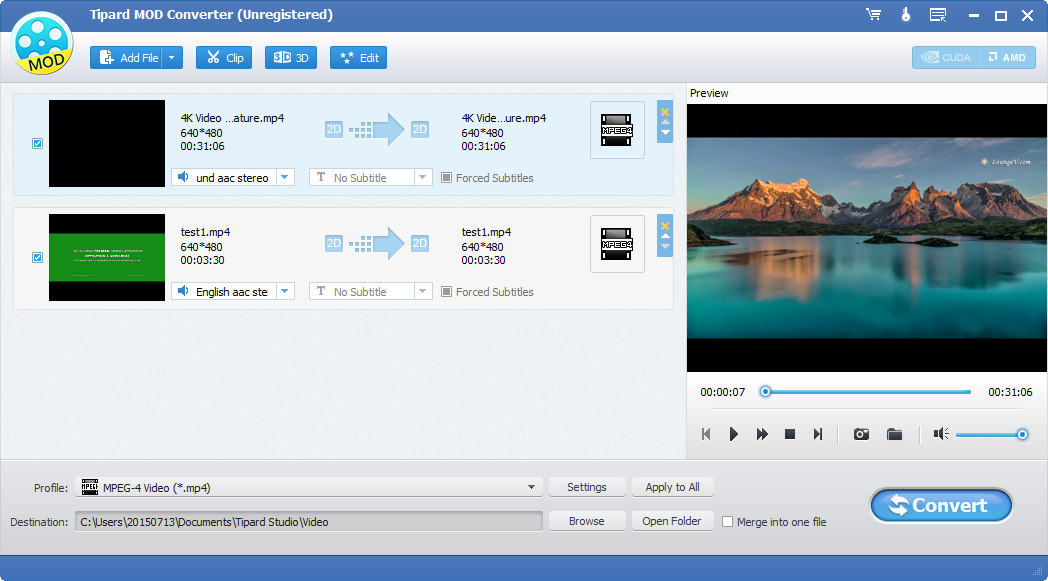
Clear and simple interface of the Mod file Converting app makes the operation is so easy that even beginners can finish the conversion within few seconds and clicks by following easy-to-understand introductions. There is a built-in player within the converting software, which supports playing and previewing the source video and output video at the same time. Thus, you can see the converted video effect more clearly. This converter also provides you with a function of auto-upgrade. So once connected the Internet, your computer will detect automatically if there are the newest version released. The auto-upgrade function will always you own the newest version of the program.


Merge several videos into one
To convert several mod clips into one video without any standstill or jump, you can merge many mod videos before conversion.

Rename
For some mod videos which need to be converted to the same folder, you can rename the video at preference.

Customize save as destination
For the output destination, you are allowed to select as needed not only referring to the videos but also capture image.

Faster converting speed and higher converted quality
Using it to convert .mod file, you can enjoy faster converting speed and converted video with higher quality than others.

Maryanne:The converting software is very practical. The operation is so easy that even an amateur like me can convert Mod to other video formats like mp4, mov, avi conveniently. It is really a good assistance.

Robert: This Mod converter can convert my precious recordings formatted in mod, avchd from Canon digital camcorders. I converted some home mod movies and watch them on my iPhone everywhere now!

William: Its powerful converting and editing functions help me so much. It makes convert HD camcorder file (.mod) to MP4 much simpler. And I also convert my mod videos to iMovie, Quicktime and more software for better enjoyment. It is really friendly!