
About | Privacy Policy | Terms of Use | Support | Contact Us
Copyright © 2026 Tipard Studio. All Rights Reserved.
Points:0
RedeemThis best DVD ripping software enables you to ripDVD to MP4, MOV, MKV, ProRes, WebM, AVI, and other rare containers like M4V, TS, VOB, MPEG, etc. with fast speed and high video quality. Also, it can extract DVD audio to popular audio formats like MP3, WAV, M4A, AAC, AC3, etc. Moreover, you can convert DVD movies to presets that suit popular digital devices like iPhone 17/16/15, iPad, iPod, Apple TV, Samsung, HTC, LG, and more.
Tipard DVD Ripper can remove any restriction (CSS, 99-Title, APS, AACS, region-codes etc.) on all types of DVD, including DVD-RAM, DVD-R DL, DVD-RW, etc. You can convert DVD contents to many video and audio formats and build your digital movie library without the headache of encryption errors.
Moreover, Tipard DVD Ripper keeps developing the decoding and decrypting technology to deal with all the latest protections. You can rip and convert any homemade or purchased DVDs, and back up the contents in various digital file formats.
This DVD ripping program lets you back up full DVD to ISO and DVD folder with the original structure. After converting, videos, audio tracks, chapters, subtitles, and many other audio/video presets will be reserved. Thus, you can enjoy the DVD folder and ISO without any quality loss, and you are also able to directly burn the DVD folder or ISO to another disc.
Tipard DVD Ripper can also help you rip DVD to lossless MPG and MKV, keeping the original structure and content. That means you can convert DVD to digital while keeping the original quality, while obtaining wide compatibility for displays and players.
If you want to watch DVD movies in a high-resolution screen, you can upscale DVD to 1080P and even 4K in Tiaprd DVD Ripper. It uses AI techniques to upscale the DVD resolution and enhance the video quality. You can enjoy DVD videos on your TV, high resolution monitor.
Tipard DVD Ripper can also increase the frame rate of your DVD movie from 24fps to 60fps or even up to 480fps. You can enjoy the highly smooth video with rich details and crisper definition. Enjoy the excellent home-theatre watching experience.
With the adoption of the NVIDIA® CUDA™ technology, AMD APP Acceleration, and multi-core CPUs supporting technology, the ripping process will be over in a short while and has 30× faster speed than others.
Besides, it supports batch conversion, so you're able to get multiple different video formats in one conversion. Hence, you can simultaneously rip several long DVD movies to popular video or audio formats in a short period of time while maintaining the complete content and original image and audio quality.
Tipard DVD Ripper offers many video editing features for your DVD videos. Before you rip DVDs, you can check those gorgeous editing features to adjust your videos.
Besides basic editing features, Tipard DVD Ripper also provides you with a complete set of tools to help you refine your DVD movies. It enables you to make GIF images, compress video sizes, create 3D movies, and more.
GIF Maker
You can create funny GIFs without time limit from your DVD and many other videos or photos.
3D Maker
Create customized 3D videos from your DVDs and maintain high quality and support up to 4K resolution.
Compress DVD Videos
Reduce the size of DVD movies so that you can store them with little storage on your PC or USB.
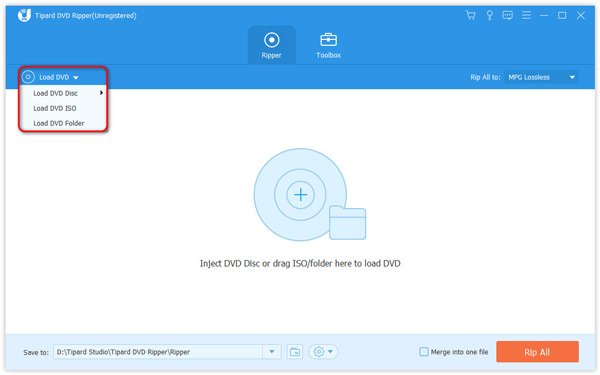
1. Load DVD
Click the Load DVD button on the top left side to load your DVD disc or DVD ISO/folder.
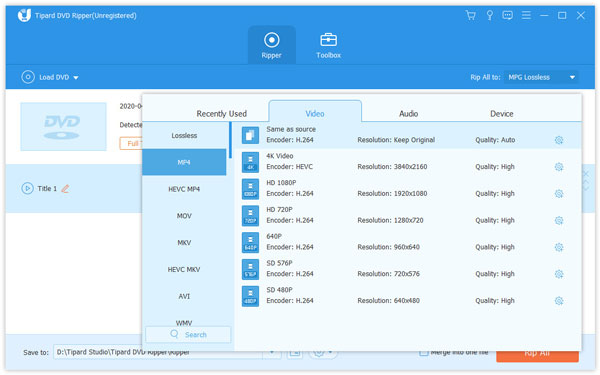
2. Choose Output Format
Choose your desired titles and set the output format for your DVD, such as MP4(H.265).
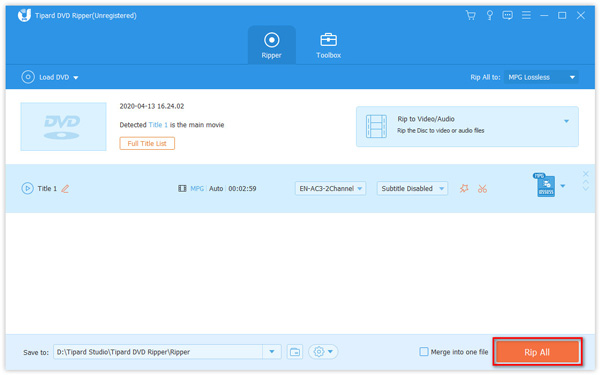
3. Rip DVD
Click Save to to select a destination folder and click the Rip All button to rip DVD to the specified format.
Sunny
Amateur
I use it to rip my movie DVD. There's no encryption alert anymore. Moreover, I can upscale my movie to 4K and watch it on my TV. That's so exciting and fascinating to rip and convert it so quickly!
Thomas
Student
My Japanese lingual lesson DVD got quickly ripped and I can improve the audio quality for a clearer watching and listening. This DVD ripper is so lightweight but powerful. I think it's worth staying on my PC.
Jennifer
Videophile
My movie DVD gets quickly ripped in this free DVD ripper. It takes a few minutes to rip my favorite movie to MKV. I can watch the movie on my phone, tablet, and TV. I'm to rip all my DVD collections with it.
How can I check my Tipard DVD Ripper registration code?
After you purchase a Tipard DVD Ripper subscription plan, you will get an email sent from Tipard including your order detail with the registration code. You can use the registration code to activate Tipard DVD Ripper.
Is it safe to use Tipard DVD Ripper?
Yes, it is. It's totally safe to use Tipard DVD Ripper. This program is 100% clean and secure. It won't steal any data on your DVD or bring damage to your disc. Feel free to download and use Tipard DVD Ripper!
What's the best format for ripping DVD to digital video formats?
You can choose MP4 as the output format to get a high-quality playback. MP4 is the most popular and commonly-used video format, and is compatible with most mobile devices, media players, TVs, laptops and more.
How do I convert DVD to MP4?
First, download this DVD ripper to your computer, install and launch it. Load your DVD disc/folder/ISO file. Then, choose MP4 as the output format. In the end, click the Rip All button to rip your DVD to MP4.
Is Tipard DVD Ripper available on Windows 11?
Yes, Tipard DVD Ripper is compatible with Windows 11, Windows 10, Windows 8.1, Windows 8, and Windows 7. You can also download Tipard DVD Ripper for Mac. It can work smoothly on your Windows or Mac computer.
Your Best DVD Ripping Solution!
100% Clean & Safe
30-Day Money Back Guarantee
100% Clean & Safe
30-Day Money Back Guarantee