
About | Privacy Policy | Terms of Use | Support | Contact Us
Copyright © 2026 Tipard Studio. All Rights Reserved.

Windows

Rip your favorite Blu-ray/DVD movies or videos to popular formats

Powerful software to play Blu-ray/DVD videos and audio

Create Blu-ray disc/folder/ISO file with your own video

Backup/Copy your favorite Blu-ray to disc/folder/iso files
Mac

Rip your favorite Blu-ray/DVD movies or videos to popular formats on Mac

Powerful software to play Blu-ray and popular video formats on Mac
Windows

Rip DVD to any popular video format quickly of full quality

Create DVD from videos and burn video to DVD/Blu-ray freely

Copy DVD to DVD disc/folder/ISO files in a 1:1 ratio
Mac

Rip DVD to any popular video format quickly of full quality on Mac

Burn or author a DVD from videos with subtitles and chapters on Mac

Copy DVD to DVD disc/folder/ISO files in a 1:1 ratio on Mac
Windows

Rip DVD, convert 4K video, edit, and upscale videos to 5K/8K

Repair broken videos with high accuracy and support many formats

Convert any video to MP3, MP4, MOV, WAV, and other 350 formats

Upscale resolution, optimize brightness and remove video noise

The easiest tool to capture screen, game, audio, etc. with high quality

Convert any 2D video to 3D video and convert 3D to 2D video

Convert 4K video to 4K/1080P and common videos

Convert TS video to various popular video/audio formats
Mac

Rip DVD, convert 4K video, edit, and upscale videos to 5K/8K on Mac

Repair broken videos with high accuracy and support many formats on Mac

Convert any video to MP3, MP4, MOV, WAV, and other 350 formats on Mac

Upscale resolution, optimize brightness and remove video noise on Mac

The easiest tool to capture screen, game, audio, etc. with high quality on Mac

Convert any 2D video to 3D video and convert 3D to 2D video on Mac

Convert 4K video to 4K/1080P and common videos on Mac

Convert TS video to various popular video/audio formats on Mac
Desktop

Rip and convert DVDs to MP3 and support other audio formats

Reset Windows Admin and Standard user account password in seconds

Accurately Convert any PDF file to Word with OCR

Convert PDF to Word, Excel, HTML and Image with OCR
Online

Easily remove watermarks from many image file formats free online
The Mod Converter for Mac is designed to convert MOD source files from camcorders directly to MP4, AVI, FLV, MOV, WMV, VOB, MPEG and so on for online, iOS/Android devices as well as to portable player. Moreover, this Mac Mod Converter can change MOD, TOD to HD videos like HD MP4, etc. or to other popular audio formats like MP3.
Tipard MP4 Video Converter is designed not only for converting all videos to MP4 formats but also editing the videos on Windows 10/8/7/xp. It is especially easy for new users, and the process of converting can be finished just by few clicks.
It is professional Mod Converter for Mac to convert any Mod file recorded by HD camcorders like JVC, Panasonic, Canon, Sony to all popular video/audio formats for Mac. You can translate mod to MP4, MPEG, MPG, MPV, VOB, WMV, MOV, MKV, AVI, FLV, MPEG-1, MPEG-2, etc. Or convert mod video file to music/audio formats like MP3, WMA, AAC, OGG, WAV, and M4A. For better video enjoyment, it highly support converting HD videos like HD MP4, HD FLV, HD AVI, HD TS, HD MTS, HD M2TS and more.
For watching mod file anytime and anywhere, you can convert Mod, TOD to almost portable players and devices with this MOD Video Converter with ease. It can help you export and put your converted mod video on iPhone, iPad Pro/Air/mini, iPod, Samsung, HTC, LG, Windows phone, Android tablets, Sansa, Sony Walkman, Creative Zen, Apple TV, Nokia, PSP, Zune, etc.
You can own different style videos made by yourself with this mod video editor.
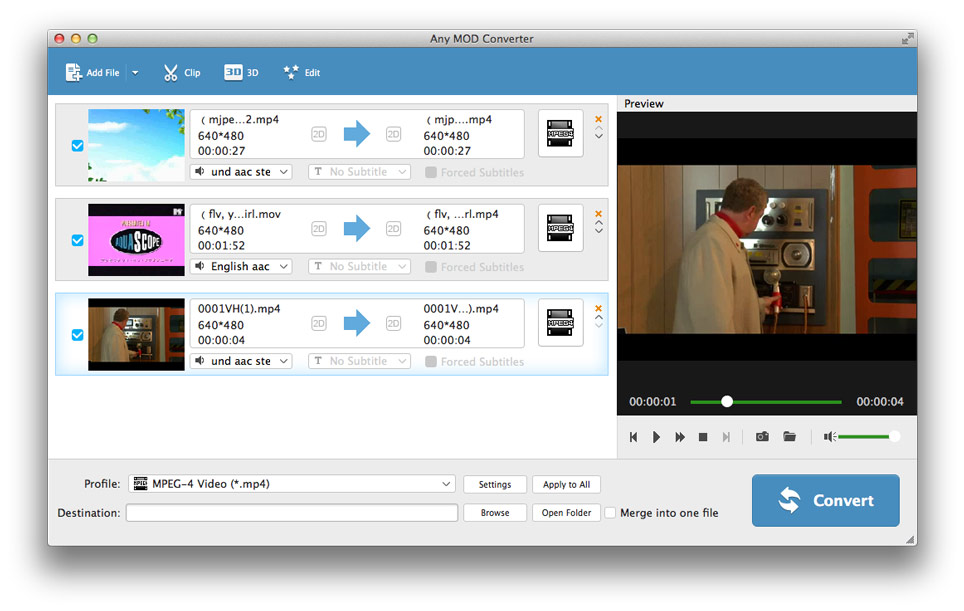
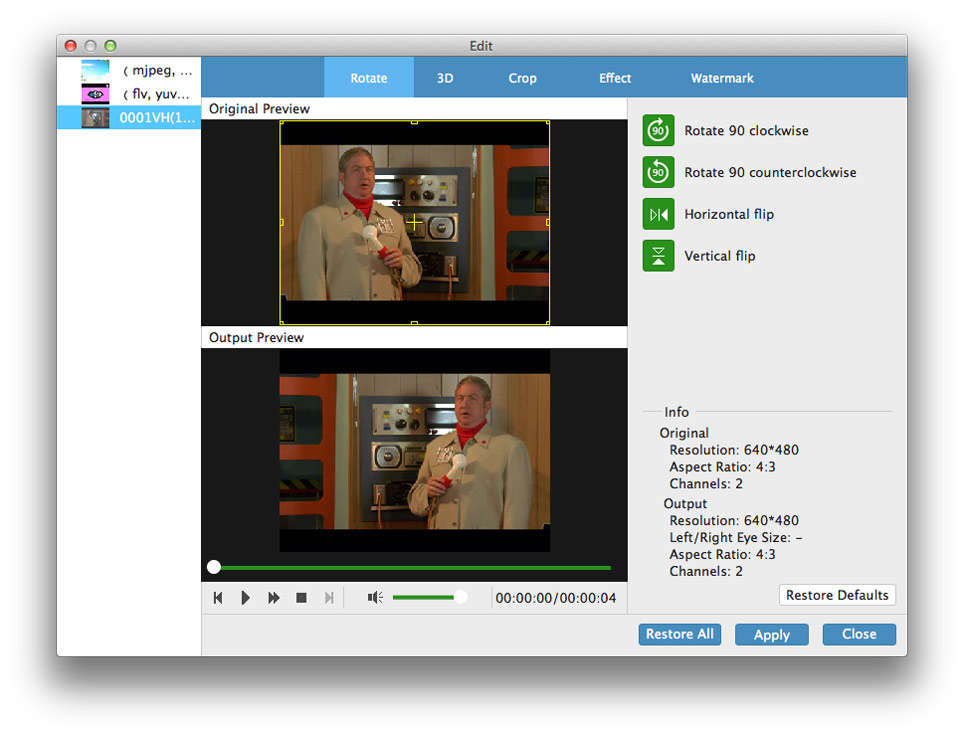
Adjust video effects - Adjust the video Brightness, Contrast, Saturation to better and special effects, even check Deinterlacing to upgrade your video effect by converting interlaced video into a non-interlaced form Trim your video clips - Clip any segments of your video by setting the exact start and end time or just drag the slide bar.
Crop the play region of video - Adjust the playing region of the mod movies to fit for your player and favor with this Mod Converter for Mac. Merge several chapters of video into one file - With several mod files merged into one file for output, you'll enjoy a single long movie with a single click.
Cool watermarks provided for you - You can add pictures or texts to your video as own preference.
Free adjust settings to help you get the customized video perfectly such as outputting multiple formats for one video at the same time.
This Mac Mod Converter can output different formats for one video simultaneously, which brings great convenience and make the conversion faster and easier to save much time.
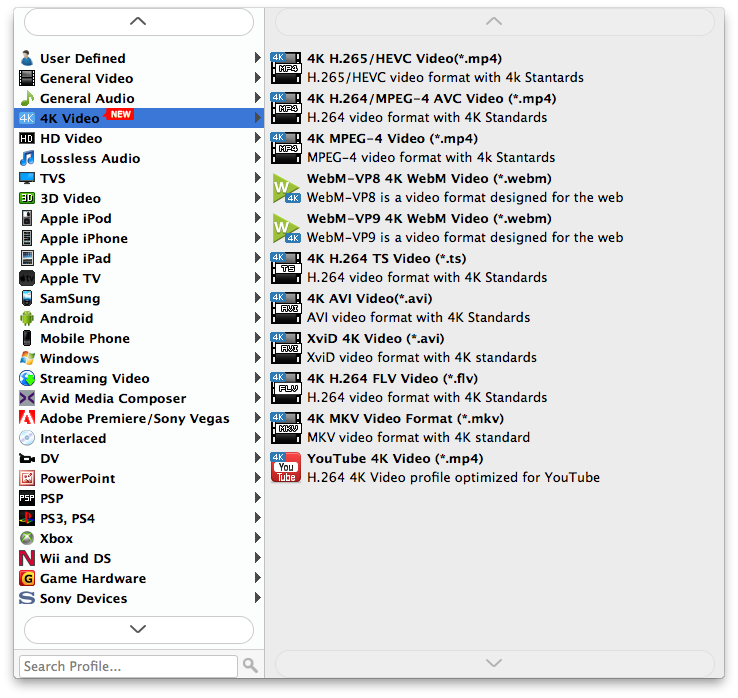
Personalized profile - Within the Mac Mod video Converter, classified and powerful profile is sorted by devices and video formats, and it would be convenient to you to select what you need or output your needed video directly, and any customized profile or settings can be saved as user-defined profile.


Fast mod conversion speed
It can accomplish the mod converting task fast and conveniently.

Add subtitles and choose audio track
The Mac Mod Converter provides you with various subtitles and audio tracks.

Preview and snapshot
It allows you to play and preview the original and output video effect simultaneously and capture the pictures as you favor.

Easy to use
With providing the fastest conversion speed, this MOD Converter for Mac presents you a user-friendly interface.
System Requirements
What's New
| Support Input File Formats | |
| Video | MPG, MPEG, MPEG 2, VOB, DAT, MP4, M4V, TS, MKV, MPV, MOD, TOD, QT, MOV, DV, DIF, MJPG, MJPEG |
| HD Video | HD TS, HD MTS, HD M2TS, HD MPG, HD MPEG,HD MP4, QuickTime HD MOV |
| Support Output File Formats | |
| Video | MPEG-4, H.264/MPEG-4 AVC, MOV, M4V, AVI, DivX, XviD, ASF, WMV, MPEG-1, MPEG-2, 3GP, 3GPP, MKV, FLV, SWF, VOB, DV, Super VCD (NTSC, PAL, SECAM), VCD(NTSC, PAL, SECAM) , DVD(NTSC, PAL, SECAM) |
| Audio | AAC, AC3, AIFF, AMR, AU, FLAC, MP3, M4V, MP2, OGG, WAV, WMA |
| HD Video | HD H.264, HD AVI, HD MPG, HD TS, HD WMV, HD MPEG 4, HD MOV, HD ASF |
| Snapshot Image | JPEG, GIF, BMP |
| Support Devices | |
iPhone 18 Pro/iPhone 18 Pro Max/iPhone Duo, iPhone 17/iPhone Air/iPhone 17 Pro/iPhone 17 Pro Max/iPhone 17e, iPhone 16/iPhone 16 Plus/iPhone 16 Pro/iPhone 16 Pro Max, iPhone 15/iPhone 15 Plus/iPhone 15 Pro/iPhone 15 Pro Max, iPhone 14/iPhone 14 Plus/iPhone 14 Pro/iPhone 14 Pro Max, iPhone 13/iPhone 13 Pro/iPhone 13 Pro Max/iPhone 13 mini, iPhone 12/12 Pro/12 Pro Max/12 mini, iPhone 11/11 Pro/11 Pro Max, iPhone XS/XS Max, iPhone XR, iPhone X, iPhone 8, iPhone 8 Plus, iPhone 7, iPhone 7 Plus, iPhone 6s, iPhone 6s Plus, iPhone 6, iPhone 6 Plus, iPhone SE, iPhone 5s, iPhone 5c, iPhone 5, iPhone 4S, iPhone 4, iPhone PSP, PS3 Wii, Zune, Zune 2, Xbox, Xbox 360 Google Phone, Sony Walkman, Archos, Creative Zen, iRiver, BlackBerry, BlackBerry Storm, BlackBerry Bold, Palm Pre, Motorola, LG, Sony Ericsson, Mobile Phone, etc Dell, HP iPAQ, General Pocket PC |
|

Christina:Mac Mod Converter really assists me to convert videos with overwhelming speed. I record a mod video with my Canon camcorder, but I need to play it on QuickTime for enjoying with my friends. With this Mod Converting app, I export a mod movie to mov format with ease. It's great.

Anna: Please notice me if you develop new programs or added new functions. I would like to have a try. Because I really like this mod converter, it helps me convert mod video to mp4, wmv, mkv and more formats for better use. It totally helps me a lot.

Lisa: I want to play a mod video on my iPhone. I download and use this mod video converter for a long time. It can directly convert mod to iPhone format. And I can also free edit my mod file effect easily. In a word, I like it, and extremely recommend to you.
Rip DVD disc, folder, iso files to 2D/3D video formats and set 2D/3D video editing at your preference.


