




About | Privacy Policy | Terms of Use | Support | Contact Us
Copyright © 2026 Tipard Studio. All Rights Reserved.
 [4.9] 309 Reviews
100% Clean & Safe
30-Day Money Back Guarantee
100% Clean & Safe
30-Day Money Back Guarantee

 Video Converter
Tipard Video Converter offers you a powerful converting function to convert any video file to 4K UHD and 1080p HD video using the latest kernel and advanced technology. All mainstream digital devices, such as iOS and Android devices, are supported by this software.

Convert Popular Formats with High Quality
The best video format converter lets you change videos among MP4, AVI, WMV, MKV, MTS, TS, MXF, MOV, M4V, FLV, WebM, F4V, VOB, etc., even 4K UHD videos at super speed with zero quality loss. Meanwhile, it can convert audio, including extracted audio from video, to MP3, AAC, AC3, and so on. Besides, if you download many online videos, you can also use the video to audio converter to change video to AVI, MP3, etc., for enjoying on iPhone, iPad, iPod, and Android devices. This magic video converter converts 4K video with 100% original video quality.

Play Converted Video Smoothly on Many Platforms and Devices
The converted video can be played smoothly on most computers and mobile devices, delivering excellent results. Once the video conversion is complete, it can be played on a variety of compatible devices, such as Windows, MacBook, Microsoft Surface Book, iPhone, iPad, iPod touch, Samsung Galaxy, Huawei, Sony Xperia, and other multimedia players. Additionally, you can share the converted video on popular social media platforms like TikTok, Twitter, Instagram, YouTube, and more.

This multifunctional video conversion software allows you to define output settings to optimize video conversion results further. It offers flexible video settings such as video encoder, frame rate, resolution, aspect ratio, and video bitrate. At the same time, you can also adjust audio settings such as audio encoder, sample rate, channels, and audio bitrate to optimize the audio quality of the converted file.
With this ultra-intuitive interface to convert videos, even beginners can easily convert multiple formats. Just one click on the convert button to batch convert videos to various mainstream formats, making viewing, sharing, and your digital life more convenient. With NVIDIA, Intel, and AMD technology, conversion speeds for any format are up to 6 times faster than ever before.

Before converting videos to 4K and HD videos, you can recreate your video with multiple editing functions, like crop, watermark, etc., to achieve the desired result.
Rotate and Crop Video
Rotating the video direction by setting this video 90 degrees clockwise or counterclockwise. Also, it can set specific values or 4:3/16:9 ratio to fit the screen. Crop modes are Letterbox, Medium, Pan & Scan, and Full.
Enable 3D Settings
The 3D feature allows you to convert videos with 3D effects. The 3D depth can be changed by entering specific numbers. You can then view the modified 3D video in high quality on a VR device.
Adjust Effect
It allows you to customize the brightness, contrast, saturation, or hue of your videos. In addition, you can adjust the volume by dragging the blue slider to achieve better audio effects.
Enhance Quality
It offers four options: optimize brightness and contrast, enhance resolution, remove video noise, and reduce video shaking. After setting, you can preview the effect before applying the settings to all videos.
Watermark Video
Regarding watermarks, it supports adding special text or image watermarks, and you can set the position, size, color, font, and effect of the watermark. This effectively helps you protect your video copyright on media platforms.
Audio & Subtitle Track
If the video contains multiple audio tracks or subtitles, the software allows you to remove the original subtitles and add matching subtitles. It also supports muting the original background sound or replacing it with a new audio track.
 Tipard Video Converter Standard Tipard Video Converter Standard |
 Tipard Video Converter Ultimate Tipard Video Converter Ultimate |
|
|---|---|---|
| Features | ||
| Supported output file formats | 350+ (MP3, MP4, MOV, WAV, AVI, WMV, TS, etc.) | 500+ (MP3, MP4, MOV, WebM, WAV, AVI, WMV, TS, MKV, VOB, MPG, ASF, DV, etc.) |
| Converting speed | 6× | 120× (experience Level-3 Hardware acceleration: NVIDIA NVDEC/NVENC, Intel Quick Sync Video and OpenVINO, AMD AMF and ROCm / ONNX Runtime.) |
| Editing features | Basic tools (enhancing, trimming, rotating, etc.) | Also have advanced tools (Video Speed Controller, Video Watermark Remover, etc.) |
| Batch converting |  |
|
| Enhance video quality | |
AI Upscaling, Noise Reduction, Video Deshaking, and Auto Color Correction |
| Rip DVD |  |
Support Copy-Protected DVDs and ISO images and VIDEO_TS folders. |
| Music Video Editing | |
|
| Video collage | |
|
| Toolbox | |
(20+ additional tools) |
| Download |
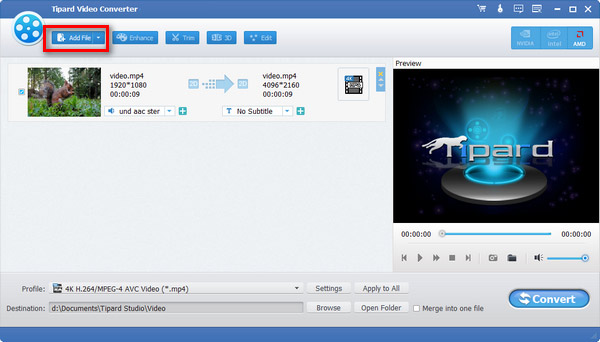
1. Add Files
Import a video file into the video file converter by selecting the Add File option on the main interface.
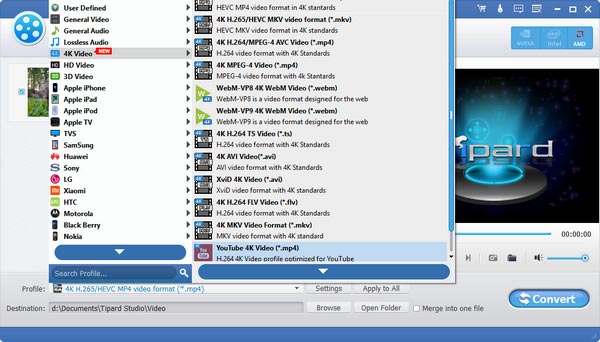
2. Edit and Choose Format
Pull down the drop-down option from the Profile list. Then, set the output format for the video.
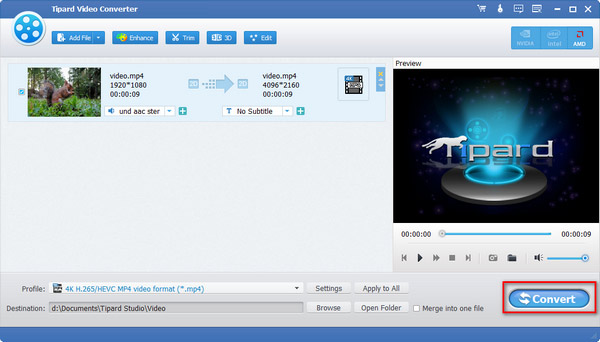
3. Export Files
Click the Convert All button to turn the video into other formats. Then, you can save the changed video locally.

Carla
Video Editor

Excellent! Thanks for your Video Converter, which helped me convert and edit videos for YouTube video formats and ratios. Now I can enjoy videos on the go.

Sophia
Vlogger
Such a truly impressive video converter! Compared to the software I tried before, it’s faster and more user-friendly. I can quickly change MKV or WMV files into MP4 without quality loss, even for social media platforms. Its smooth playback is just like the original. Totally satisfied!

Kurtt
Videophile
This Video Converting App is so fantastic. I can preview multiple online videos locally using this program. Besides, it is simple to use.
Is Tipard Video Converter safe to use?
Yes, it is. Tipard Video Converter is definitely reliable. You can use it to process your media files without worries. It won't steal your data or privacy or cause damage to your system or hardware.
Does Tipard Video Converter keep the original quality after conversion?
Yes, Tipard Video Converter allows you to select the same output settings as the source video during conversion to ensure quality, and it can also optimize video effects to improve quality.
What is the optimal video format for conversion?
It varies based on your needs. MP4 (H.264 or H.265) is highly compatible and balances quality with file size. For top-quality videos, MKV is an excellent option.

Convert Videos to All Formats Easily
100% Clean & Safe
30-Day Money Back Guarantee
100% Clean & Safe
30-Day Money Back Guarantee