


About | Privacy Policy | Terms of Use | Support | Contact Us
Copyright © 2026 Tipard Studio. All Rights Reserved.

Windows

Rip your favorite Blu-ray/DVD movies or videos to popular formats

Powerful software to play Blu-ray/DVD videos and audio

Create Blu-ray disc/folder/ISO file with your own video

Backup/Copy your favorite Blu-ray to disc/folder/iso files
Mac

Rip your favorite Blu-ray/DVD movies or videos to popular formats on Mac

Powerful software to play Blu-ray and popular video formats on Mac
Windows

Rip DVD to any popular video format quickly of full quality

Create DVD from videos and burn video to DVD/Blu-ray freely

Copy DVD to DVD disc/folder/ISO files in a 1:1 ratio
Mac

Rip DVD to any popular video format quickly of full quality on Mac

Burn or author a DVD from videos with subtitles and chapters on Mac

Copy DVD to DVD disc/folder/ISO files in a 1:1 ratio on Mac
Windows

Rip DVD, convert 4K video, edit, and upscale videos to 5K/8K

Repair broken videos with high accuracy and support many formats

Convert any video to MP3, MP4, MOV, WAV, and other 350 formats

Upscale resolution, optimize brightness and remove video noise

The easiest tool to capture screen, game, audio, etc. with high quality

Convert any 2D video to 3D video and convert 3D to 2D video

Convert 4K video to 4K/1080P and common videos

Convert TS video to various popular video/audio formats
Mac

Rip DVD, convert 4K video, edit, and upscale videos to 5K/8K on Mac

Repair broken videos with high accuracy and support many formats on Mac

Convert any video to MP3, MP4, MOV, WAV, and other 350 formats on Mac

Upscale resolution, optimize brightness and remove video noise on Mac

The easiest tool to capture screen, game, audio, etc. with high quality on Mac

Convert any 2D video to 3D video and convert 3D to 2D video on Mac

Convert 4K video to 4K/1080P and common videos on Mac

Convert TS video to various popular video/audio formats on Mac
Desktop

Rip and convert DVDs to MP3 and support other audio formats

Reset Windows Admin and Standard user account password in seconds

Accurately Convert any PDF file to Word with OCR

Convert PDF to Word, Excel, HTML and Image with OCR
Online

Easily remove watermarks from many image file formats free online
Tipard iPhone Video Converter is versatile video to iPhone converting software that can spice up your multimedia life by converting videos to various iPhone modes, including iPhone 15/14/13/12/11/XS/XR/X/8. Serving as the best video converter, it is capable of converting most popular video/audio formats: MTS, MXF, WMV, MKV, AVI, MP4, MOV, MOD, etc.
Not only can it convert various videos to iPhone, iPad, iPod and Apple TV compatible formats, but also it provides all-round editing features to trim, crop, rename, adjust effect and add watermark videos.
Convert any video to iPhone
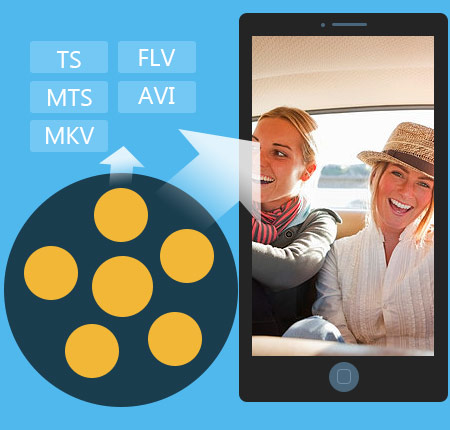
Tipard iPhone Video Converter can convert videos in a wide range of format to iPhone compatible video/audio formats. It can convert regular video format (SD), like MP4, AVI, FLV, WMV, 3GP, etc as well as convert high-definition video (HD) of MTS, M2TS, TS, MXF, etc to iPhone M4V, MOV and MP4.
Convert video/audio to iPhone compatible audio
Apart from converting countless video formats to iPhone video, it also enables users to extract audio from videos to be used as iPhone ringtone. Audio to audio conversion (MP3, FLAC, AAC, AIFF, M4V, WMV) is also available with this iPhone Converter. Moreover, the optional iPhone output profile caters to all iPhone model users.
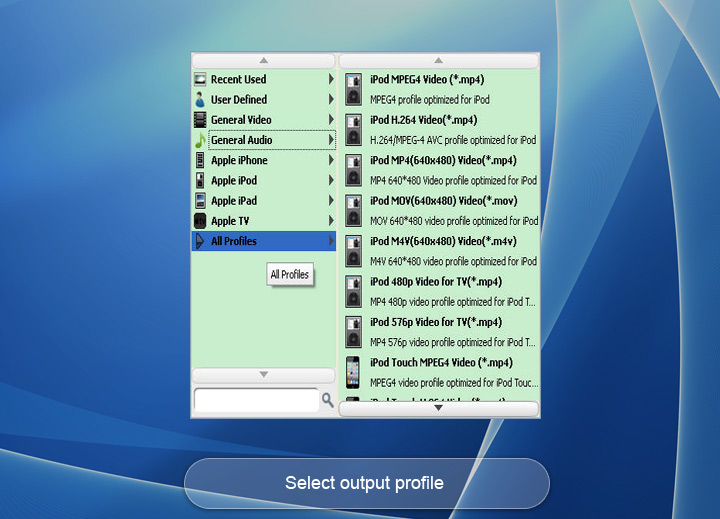
This iPhone Video Converter aims at converting videos to iOS devices, therefore, it is designed to support all iOS devices rather than iPhone only. As professional iPhone Video Converter, it allows users to convert video to iPhone, iPad, iPod, Apple TV compatible formats. You can convert video to MP4, M4V and MOV not only for iPhone but also for iPhone 3GS, iPhone 4, iPhone 4S and iPhone 5. Moreover, even if you are iPad, iPod or Apple TV users, you can use it to convert videos to your iPad/2/3/mini/4, iPod Classic/Nano/Touch, Apple TV/2/3. Apart from iOS device supported profile format, this converter also enables users to convert video to ProRes, Webm, QuickTime MOV, etc.
Powerful video editing function
Tipard iPhone Video Converter possesses almighty editing capability, including trimming, renaming, cropping, effect, watermark, preview, snapshot, deinterlacing and so forth. More detailedly speaking, you can get desired certain part of one video file to your ios device by trimming it, crop black margin and select the zoom mode to make the video displayed as your devices, embellish iPhone video effect by setting the parameters for brightness, saturation, contrast, hue, etc, add watermark of txt and picture with adjustable position, colour and transparency.
Set video/audio settings
Apart from the above-mentioned video editing function, this video to iPhone converter also applies enough parameters for users to preset before conversion to make better video output, such as video/audio encoder, frame rate, saple rate, resolution, and aspect ratio, etc. Owing to such blazing capability, this iPhone Video Converter greatly spice up your multimedia life.

Easy to use
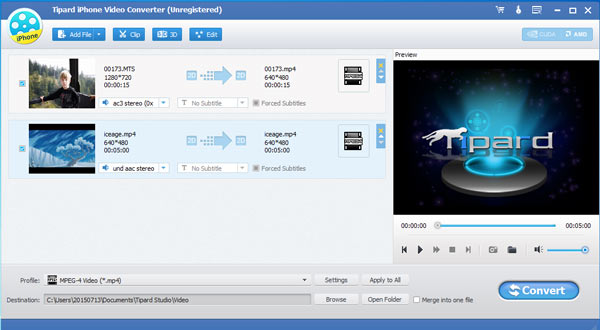
Tipard video to iPhone Converter is widely regarded as the uttermost simple and useful programme to convert videos to iPhone. Its easy-to-use feature mainly lies in the illustrated image guide and the oriented button layout, and even novice can master the usage quickly. One-stop solution for video to iPhone conversion embodies the simplicity as well.
Fast converting speed
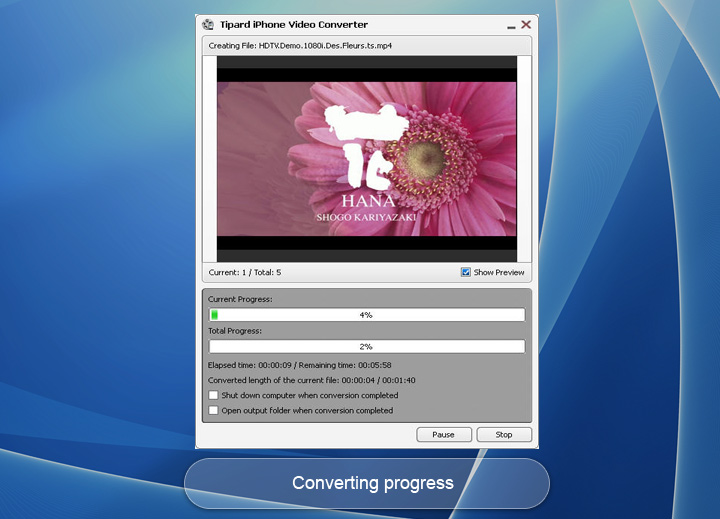
The adopted CUDA & AMD accelerator makes the iPhone video conversion with 6X faster speed. Candidly, it's not hard to imagine such equipment as your all-solution software to enjoy videos on iPhone, iPad and iPod, etc.

Preview and snapshot
You can have a preview of the added video as well as the edited video and snapshot images during preview to JPEG, PNG and BMP.

Select Audio Track and Subtitle
This iPhone Video Converter enables users to select one favourite audio track and subtitle when there are many audio tracks and subtitles for choice.

Rename & Delete
To tell the out put file from the source video file, it provides users rename function. For files no need to add, you can also delete them.

Convert video easily
It supports batch conversion with one simple click so that you can save more time to do other things.
System Requirements
What's New
| Video/Audio |
Standard video formats: TS, MTS, M2TS, MXF, TRP, TP, MP4, M4V, QT, MOV, MPG, MPEG, MPEG2, MPEG4, MJPG, MJPEG, AVI, 3GP, 3G2, FLV, MOD, TOD, RM, RMVB, WMV, ASF, MKV, SWF, F4V, VOB, DAT, DV, DIF, OGM, WTV, DVR-MS, Bink video, WebM HD video forrmats: MTS, TS, M2TS, TP, TRP, HD MPG, HD MPEG, HD MPEG2, HD MPEG4, HD MP4, HD WMV, QuickTime HD MOV Audio: FLAC, WAV, WMA, AAC, ALAC, AC3, AIFF, AMR, AU, MP3, MP2, M4A, MKA, OGG |
|---|

Abed: Amazing iPhone Video Converter! I get to know it from my friend who used it to put FLV video to iPhone. Knowing it can convert video to iPad as well after visiting your site, I used it to convert one MOD video from JVC to iPad 4. Astoundingly Wonderful.

Joan: Superb video to iPhone converter to help me convert many unordered video clips in to one ordered video for iPhone with "merge" function. Now I can watch my video on iPhone on the go with no worry about order.

Betty: It is highly appreciated with such an easy-to-use design, and even for green hand like me, it is very easy to convert one video to iPhone.
Convert DVDs and videos to popular video/audio formats, then you sync them to digital device for playback.
Rip DVD, create DVD, clone DVD, convert video and transfer various files to iPhone (iPhone 6s included).